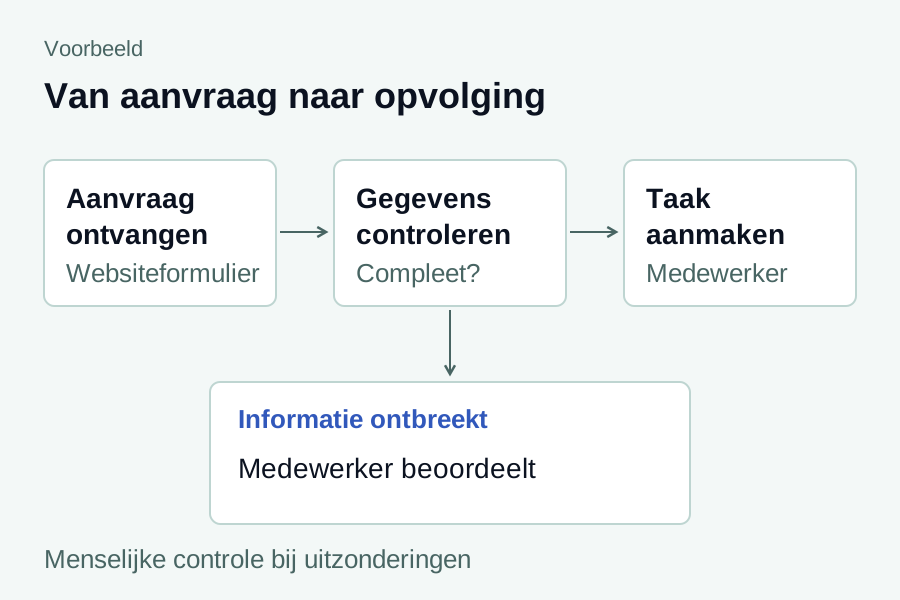
Do customer questions arrive through WhatsApp, only for your team to enter the data again afterwards? DustinLabs connects WhatsApp to your website, customer portal or business process. Let customers submit an enquiry step by step and send agreed confirmations and updates. Your team keeps an overview and decides who handles the substantive response.
Example process: from a customer message to an enquiry and a next action.
Possible applications
What can you automate with WhatsApp?
We set up a business integration through Meta's official WhatsApp Business integration. The questions, messages and follow-up steps match your way of working. Below are examples of possible applications; we assess in advance which features and integrations suit your business.
01
From customer question to enquiry
Now
A customer sends separate messages. A member of staff asks for the missing details and enters everything again.
Solution
A conversation with fixed questions collects the necessary information. The customer confirms the summary before an enquiry is created.
Review
We agree which customers will use the feature, which data is needed and when a member of staff takes over.
02
Share replies and progress
Now
Employees switch between a customer portal and WhatsApp to ask questions or report progress.
Solution
An agreed response or status change can queue a WhatsApp notification with a direct link to the enquiry or portal.
Review
Replies are linked to the correct customer and request. The management interface shows the recorded message status; a queued message does not yet mean confirmed delivery.
03
Confirmations and reminders
Now
A member of staff manually sends a confirmation or reminder after an appointment or reservation.
Solution
The existing system can send a confirmation and an agreed reminder. A link takes the customer to the correct page to view or change information.
Review
We specify consent, the number of messages and the opt-out route. Making or changing a reservation within WhatsApp itself requires a separately agreed extension.
Examples by sector
Which sectors is this useful for?
For businesses with many appointments, enquiries or status questions, WhatsApp can simplify recurring communication. Examples include these sectors:
Hairdressers and salons
Confirm appointments, send a reminder and give customers a link to change their appointment.
Restaurants and hospitality
Send reservation confirmations and reminders, or collect the information for a group enquiry.
Garages and automotive businesses
Confirm a workshop appointment, share progress and let the customer know when the car is ready.
Installation and handyman businesses
Collect the required information with an enquiry or fault report and keep customers informed about appointments and progress.
Online shops and retailers
Send an order confirmation or let customers know that their order is ready to collect.
Service providers and consultancies
Collect initial intake information, confirm appointments and refer customers to a portal for additional details.
These are potential uses. We assess in advance what fits your way of working and existing systems, and agree which features and integrations will be set up. We are also happy to explore options for other sectors.
From enquiry to use
From your workflow to a suitable WhatsApp integration
Choose the customer process
We discuss the enquiry, confirmation or update you want to automate, and who handles the follow-up.
Assess the number and systems
We check whether your business number, Meta account and existing software are suitable. We discuss using your current number and the required access in advance.
Set up messages and checks
We build the agreed questions and integrations, with verified customer linking where needed, an opt-out route and visibility of message statuses.
Test and document management arrangements
We go through the agreed customer flow and exceptions. We then specify who follows up notifications and how access, usage costs and changes are managed.
Questions before you start
Can I use my current WhatsApp number?
We assess that in advance. The options depend on the number, your current WhatsApp setup and what Meta supports for your account. We discuss the appropriate route and what it means for your staff's use before changing anything.
Can WhatsApp be connected to our existing software?
That depends on the available access and capabilities of your website, customer portal or business system. We investigate which data and actions can be connected and agree the scope. We cannot promise an integration without suitable access.
Does the automation answer all customer questions independently?
We configure the questions, messages and follow-up steps agreed in advance. Your team handles substantive questions and exceptions according to the chosen process. An AI assistant is a separate extension that requires its own information sources, boundaries and agreements.
What does WhatsApp automation cost?
You receive a quote for the agreed setup and integrations. Any management and maintenance are agreed separately. Meta message charges and any number, software or supplier costs are added separately. We discuss expected usage and costs before development.
Can customers opt out, and do we retain an overview?
We set up a clear opt-out route, for example using STOP, and agree which messages will stop as a result. Where the process requires it, a customer receives a verified link to their own account or enquiry. Your management environment shows the recorded message status and history for the agreed messages.
When can the integration be activated?
After the agreed setup and checks, once the required access and Meta approvals are available. Some messages require an approved message template. Availability and delivery remain subject to Meta's terms and checks; we agree on how your team follows up a block or failed delivery.